
Your first day in Emparity
Your first hour decides how fast your empire grows for the rest of the season. Here is what to build, in what order, and why.
In this guide 10 sections
Signing up and choosing a race
Choose Play free on the home page and pick the Seasons card. You sign up with an email address, an empire name and a race. There is no invitation and no download; the game runs in the browser, and the same account works on a phone and a computer.
Season 1 has three playable races. Humans are adaptable all-rounders. The Vorr are one mind spread across many machines. The Vael are a hive that grows its ships. Each race flies its own ship designs and has its own look on the map and in battle replays. None of them is a trap for beginners, so pick the one you like the look of.
First Flight: the guided start
A new empire opens with a short arrival scene. Your colony ship lands, the Command Center comes online, and you name your first colony. After that, a First Orders card at the top of the screen gives you one task at a time and marks the next thing to tap with a soft ring. Nothing is locked while it runs, and anything you do some other way still counts toward the order.
- Every new empire gets one free scout, already docked at home.
- The first long build the orders ask for finishes in seconds instead of minutes, once per empire.
- You can skip the tutorial from the card at any time. The starter missions take its place.

The first buildings to queue
Your home colony starts on a rocky world in a quiet system near the rim of a galaxy, with a Colony Hub and a little stock of each resource. Everything in Emparity runs on real clocks, so the goal of the first hour is simple: keep the build queue busy and make sure each new building pays for the next one.
- Metal Mines and Gas Extractors. These are your income. Mines and extractors draw energy, so they slow down if the colony runs short.
- Solar Arrays. Add one whenever the energy bar gets close to full. Running out of power slows every building in the colony, not just the newest one.
- Colony Hub upgrades. The Hub adds credits every hour and caps how high your other buildings can go. When the queue says a building is at its limit, the Hub is the next upgrade.
- Research Lab. Research is empire-wide and slow to catch up on, so start it early.
- Shipyard. Your first ships are scouts. More on those below.
Research
Every Research Lab in every colony adds to one research rate for the whole empire. One technology researches at a time and the rest wait in the queue. You pay when you queue, and cancelling refunds you in full. The first two levels of each tech are discounted, so spreading early research across several branches is cheaper than it looks. Research unlocks bigger hulls, new buildings and the harsher worlds you can later settle.
Scouting the neighbourhood
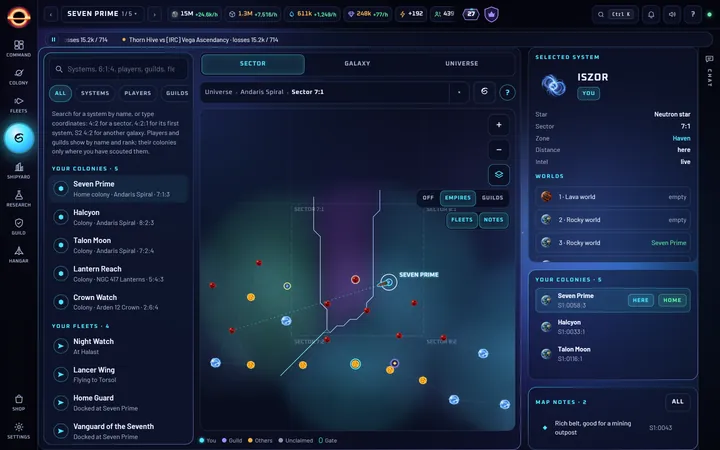
You can only attack, defend or settle a system you have surveyed, so scouting comes first. On the Fleets screen, turn on Auto-explore and your scouts will survey the systems around home on their own. Surveys fill in your map, show you who your neighbours are, and earn Empire XP the first time your own ship surveys a system.
Starter missions
The mission tracker on the Colony screen shows one goal at a time with its reward and a Go there button. The server checks your real game state, so anything you have already done counts straight away. Rewards land at your home colony and are never cut by storage limits, and every claim gives Empire XP. If a mission asks for something your server does not offer yet, you can skip it.
Finding your way around
The main screens are Colony (buildings and queues), Fleets (your fleets, flights and battle reports), Galaxy (the map) and Guild. Press and hold the Galaxy button to open the command wheel, which reaches Empire, Research, Chat, Notes, Rankings, Settings and Help. On a computer, the Command Center puts your whole empire on one screen.
New-player protection
A new empire can't be attacked for its first days on the server, or until it grows past a certain size, whichever comes first. A shield chip on the Colony screen counts down the time left. Two things are worth knowing:
- Attacking anyone ends your protection at once, for good. Launching the attack is enough. Build up first, then decide.
- Protection does not stop scouts or spy probes. Other players can see what you are building, so plan your defences before the shield drops.
There is also a bully limit: a much larger empire can't attack one far smaller than itself, unless the smaller one attacked first or the two guilds are at war.
Your second colony
Once your Shipyard is high enough you can build a Colony Ship. Survey a free world, send the ship, and it lands as a new colony. Each colony you own makes the next colony ship more expensive, and every colony after the first adds a little admin upkeep to all of them, so the best second colony is a good world, not just the nearest one. On a small or barren world, build a Habitat early so the population can staff your buildings.
Going away
If you will be away for a few days, book vacation mode in Settings. After a short delay nobody can attack your colonies, and they keep producing while you are gone. You can't launch fleets or start new builds during a vacation, and you get a set number of vacation days each year.
Next, read the economy guide to learn how credits, metal, gas and rare minerals flow through an empire.