
The galaxy map and scouting
Emparity's universe is twenty galaxies and growing. The map is where you find colony sites, spot threats, plan routes and see who holds which region.
In this guide 7 sections
Three ways to look at the map
The map has three scopes, switched along the top of the screen.
- Sector shows the systems around one sector: stars, worlds, colonies and fleets in flight.
- Galaxy shows a whole galaxy as a grid of sectors. Sectors where you have colonies have a ring in your colour, and sectors you have never scouted are dimmed.
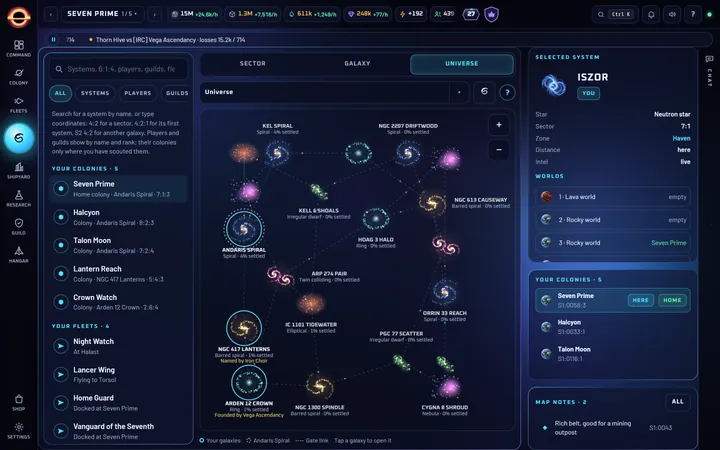
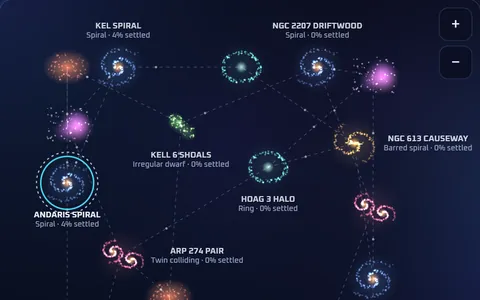
- Universe shows every galaxy, how settled each one is, who founded or named it, and the Galactic Gates that link them. It can lie flat as a map of gate links or stand up in depth, and you can turn it and zoom.
The path under the scopes always shows where you are (universe, galaxy, sector), and tapping any part of it steps back out. The first time you open the map it centres on your home colony; after that it remembers where you left it.
Surveying: why scouting comes first
Most of the map is unknown until you survey it. You need a survey of a system before you can attack, defend, settle, spy on or haul to someone else's colony there. Surveys come from your own scouts, or from guildmates and allies who share their intel with you.
The easy way to start is Auto-explore on the Fleets screen, which sends your scouts out to survey the systems around you on their own. Later you will want to scout with purpose: a promising world for a colony, an asteroid belt for Miners, or a neighbour you are thinking about attacking. A surveyed system shows each world's type, size and resource ratings, including rare-mineral richness.
Search, jump and notes
The arrow at the end of the path opens a jump list: your colonies first, then every galaxy, then a grid of the sectors in the galaxy you are in. The search box finds systems by name, players and guilds by name, your own colonies and fleets, and your map notes. Map notes are pins you leave yourself (or your guild) on systems worth remembering.
The influence map
Turn on influence to shade the map by who dominates each region. Every colony spreads influence around its system, and bigger colonies reach further and push harder. Where influence overlaps, whoever has the most at that spot dominates it. The shade is bright where the hold is strong and faint where it is contested.
The influence map is display only. Nobody claims, holds or pays for territory, and nothing on it counts down. It simply shows the map as it is, built from the colonies you know about. You can view it by empire or by guild, where whole guilds show as one territory.
Travelling between galaxies
Fleets, scouts and colony ships can fly to systems in other galaxies. There are two ways across.
Galactic Gates
Gates join the galaxies in a network. Each gate pair links two galaxies, one end near the east edge of the older galaxy and the other near the west edge of the newer one. A fleet bound for a galaxy further along crosses every gate on the way in one trip.
The Intergalactic Drive
With the right research, fleets can jump straight to another galaxy instead of flying through the gates.
Jump Gates
A Jump Gate is a ring you build over one of your own colonies. Fleets leaving a colony with a gate fly faster, and with gates at two of your colonies in the same galaxy you can jump a fleet straight from one to the other, however far apart they are. You can let guildmates jump in too, for peaceful orders only. Jump Gates never link galaxies.
A universe that grows
New empires start in Haven systems near a galaxy's rim. When enough of the Havens hold colonies, a new galaxy opens, linked to the newest one by a fresh gate pair. New players start there, and nobody has surveyed it yet, which makes the first days of a new galaxy a good time for guilds to migrate in together. A newly opened galaxy can be given a name, which earns a plaque on the galaxy map.
The core
At the centre of every galaxy is a black hole. Systems close around it are marked as core on the map. The core matters late in a season, when guilds compete to build and ignite a Singularity Tap there. Read about that in the guilds guide.